

How to transfer WhatsApp data from Android to iPhone? This question comes to your mind whenever you change your phone. How to solve this problem is what we are going to discuss!
Have you been using Apple products for a long time? If ‘yes,’ you must have faced problems regarding data. The problems are not only faced while transferring data in-between Apple products. The problem exists in transferring data between iPhone and Android.
The issue was to transfer WhatsApp from iPhone to Android. New things are discovered in the field of transferring data between different devices. What are the discoveries? Read ahead and find out!
Part 1: 2 Ways for Transferring Data from Android to New iPhone 2022
Are you an Android user who recently started using iPhone? You must be enjoying the different features and functionalities of the iPhone. The question is, how to do WhatsApp transfer from Android to iPhone? Let’s share 2 easy ways to WhatsApp transfer backup & restore.
1.1: Easy-to-Use and Convenient Mobile Application
If migrating WhatsApp from Android to iPhone is what your concern is, try the Wondershare MobileTrans mobile app. The ultimate helper and best solution for WhatsApp transfer. The mobile application easily transfers various WhatsApp data between your iPhone and Android. The data includes messages, images, videos, files, attachments. Even WhatsApp emojis are also transferred between mobile devices.
Wondershare MobileTrans is not just useful for transferring WhatsApp data, but the application is also capable of sharing files with your friends and family. You can also transfer phone data between Android-Android, iPhone to Android, and also Android to iPhone. Let’s share a step-by-step guideline for your assistance to use Wondershare MobileTrans:
Step 1: Select Transfer Option
Start by downloading the mobile app, MobileTrans, and then launch it. From the main screen, select the ‘Android to iPhone’ option and login into your WhatsApp account. Make sure you give the relevant phone number. Lastly, hit the ‘Next’ button.
Step 2: Start Transfer Process
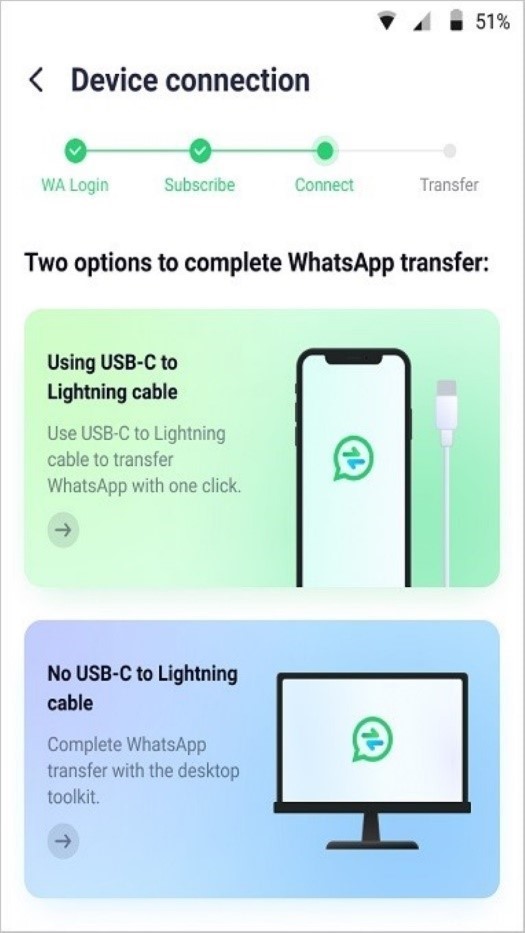
Now, you are just a click away from transferring the data. Just select the ‘Using USB-C to Lightning Cable’ option and continue the process by following the on-screen instructions. This will start the process of transferring WhatsApp messages from Android to iPhone.
1.2: Features Enriched and Powerful WhatsApp Transfer Tool
Do you want to know how to transfer WhatsApp chats from Android to iPhone? Let us introduce Wondershare MobileTrans, a desktop application. This is a very powerful tool when it comes to mobile data transfer, either from Android to iPhone or the other way around. Not just this, the tool is also great for restoring WhatsApp backup to devices.
Do you know what sort of data is transferred or backed up? With Wondershare MobileTrans, you can easily share WhatsApp messages, photos, videos, and also attachments. Surprisingly, all the data transfer is safe and lossless. Moreover, the platform works perfectly with various brands, including the big names like LG, Motorola, Samsung, Apple, and others.
If you wish to use MobileTrans but are scared to use it, let us help you by sharing the steps to use this powerful transfer tool:
Step 1: Launch MobileTrans WhatsApp Feature
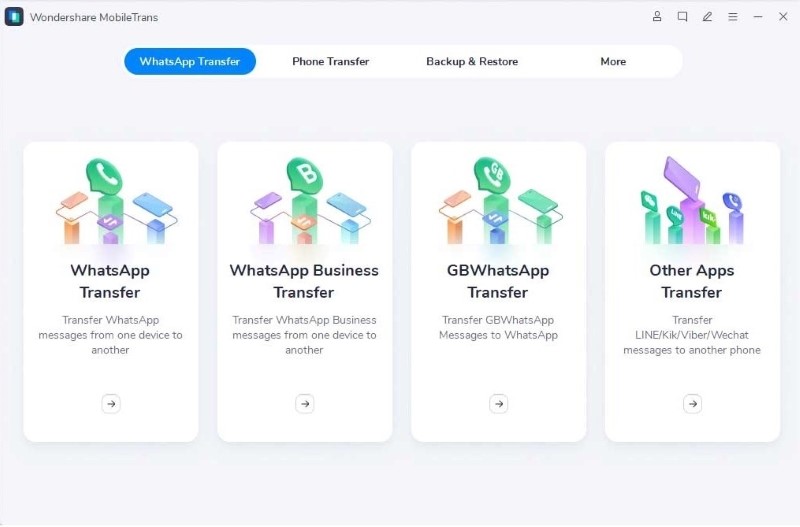
After you have installed the iphone unlock for free software, launch it on your respective device. From the home screen, select the ‘WhatsApp Transfer’ module. After this, select the ‘WhatsApp Transfer’ tab to use the WhatsApp transfer feature of MobileTrans.
Step 2: Connect Phones to Computer
At this point, you should connect both your phones with the computer. This is because the software loads and prepares all the data before the transfer. After connecting the devices, you can initiate the transfer by hitting the ‘Start’ button. Moreover, a ‘Flip’ button is available to change the source and destination devices if they are wrong.
Step 3: Data Transferred
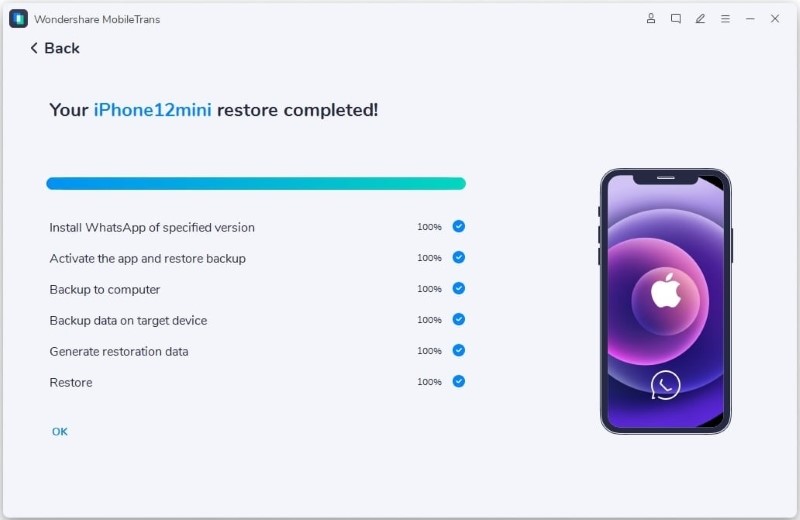
While the data is being transferred, make sure you do not touch or move the phone. As soon as the data is transferred, you can disconnect the devices and check the transferred data.
Part 2: Transfer WhatsApp Data from Old iPhone to New iPhone 2022
You can also transfer data from the old iPhone to the new iPhone. Do you know how? Try using iCloud. It is built into every Apple device. iCloud is a cloud storage service that connects all the Apple device’s data with each other, which means you can access one Apple device data from another.
With this, all your images, files, notes, and everything is with you, every minute, where ever you go. Moving on, let’s jump on the steps to transfer data via iCloud:
Step 1: Open the ‘Settings’ app on your old iPhone. There, tap on your name at the top and then select the ‘iCloud’ option. Scroll down in the iCloud tab till you navigate ‘WhatsApp’ and check if the sync option is turned on.
Step 2: Next, head to WhatsApp on the old phone and open the settings. From the settings screen, go to the ‘Chat’ option and hit the ‘Chat Backup’ button. From the next screen, select the ‘Backup Now’ option.
Step 3: As soon as the backup ends, go to the new iPhone and install WhatsApp from App Store. After that, you have to set up WhatsApp with your phone number and iCloud account.
Step 4: At this point, the ‘Restore from iCloud’ screen will appear on iPhone with the option of ‘Restore Chat History.’ Click on this option to start restoring messages and attachments to the new iPhone.
Bottom Line
After reading this article, you will never have to worry about how to restore WhatsApp from Android to iPhone. The article above has shared detailed steps and transfer tools that can easily and quickly transfer your WhatsApp data from Android to iPhone. Don’t forget Wondershare MobileTrans is a powerful and famous tool for transferring purposes.
